Get your software package.
After payment, open Stay Ready Software Downloads in Whop. Your package includes the Windows installer, Chrome/Edge browser edition and setup guide.
 Buy now — $99 ↗
VACATION RENTAL HOSTS · CO-HOSTS · SMALL PROPERTY MANAGERS
STAY READY SOFTWARE
Track inspections, unfinished repairs and arrival approval in one offline workspace. See what still needs attention before the next guest checks in.
$99 USD once · No subscription · No Excel · Up to 3 computers
Windows installer + Chrome/Edge browser edition. Initial online activation required.
Secure checkout on Whop. Applicable tax is shown before payment.
A REAL VIEW OF THE SOFTWARE
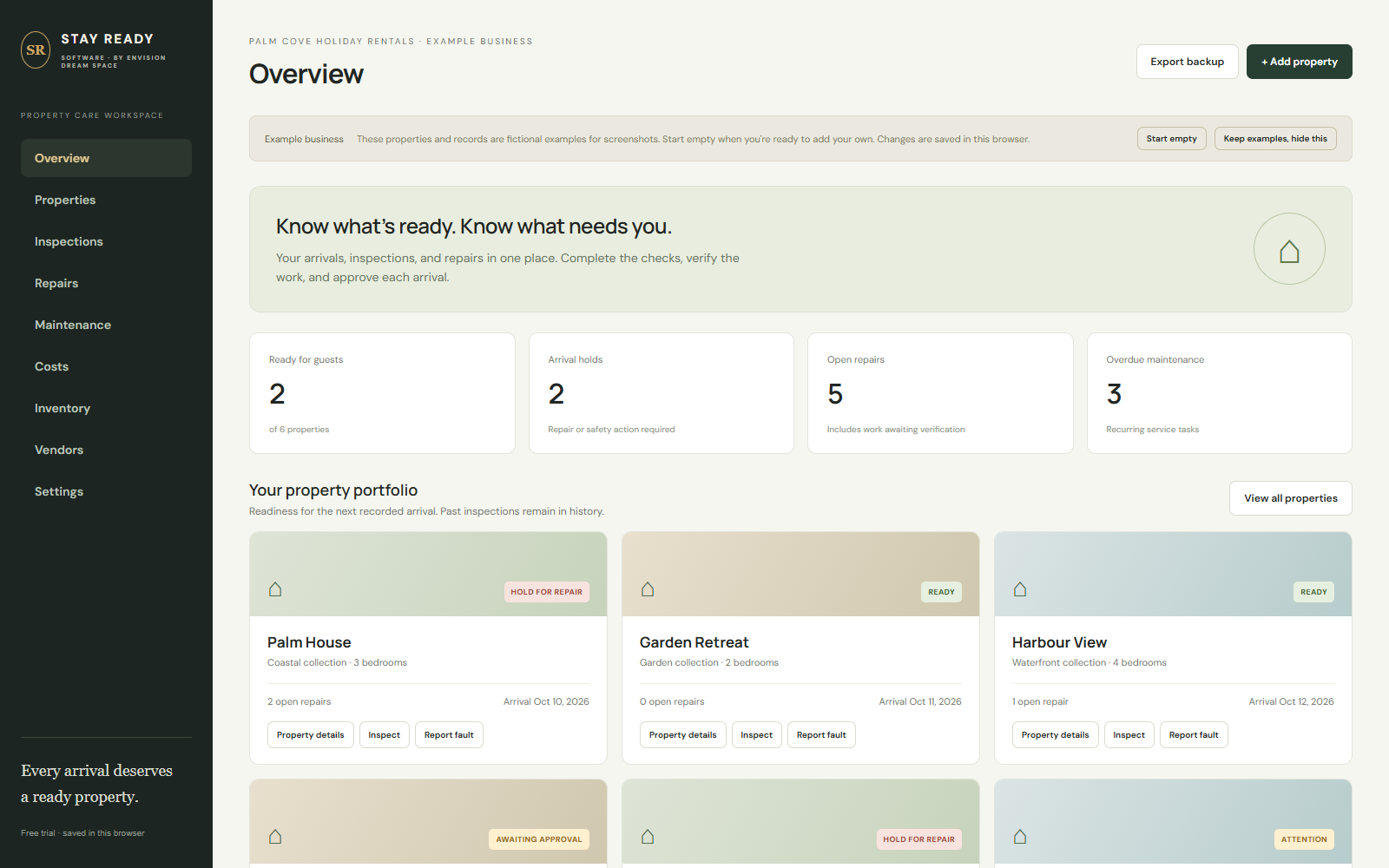
See arrival holds, open repairs and recorded readiness together.
Software screens show fictional example records, not customer results.
90 SECONDS · THE ACTUAL SOFTWARE
Watch a failed air-conditioning check become an assigned repair, then see the verification, inspection recheck and final arrival approval. Marking the repair complete does not clear its hold.
Edited screen capture with narration and on-screen captions. Fictional demonstration records. READY records checklist approval; it is not a safety certification.
FROM PURCHASE TO YOUR FIRST PROPERTY
After payment, open Stay Ready Software Downloads in Whop. Your package includes the Windows installer, Chrome/Edge browser edition and setup guide.
Copy your key from Software in Whop and paste it into Settings → Enter licence key. Connect to the internet for this first activation.
Record inspections, assign repairs and verify completed work. One business can activate up to three computers; each keeps separate local records.
FROM FINDING A FAULT TO RECORDING APPROVAL
Follow the issue through the work, then record the arrival decision. A repair marked complete still needs verification.
Use the 42-point checklist to record the property inspection before arrival.
Assign repairs, record due dates and print a work order for the job.
Verify the work before the applicable arrival hold clears.
Record final approval. Changing an inspection clears its previous approval.
THE UNFINISHED-REPAIR CHECK
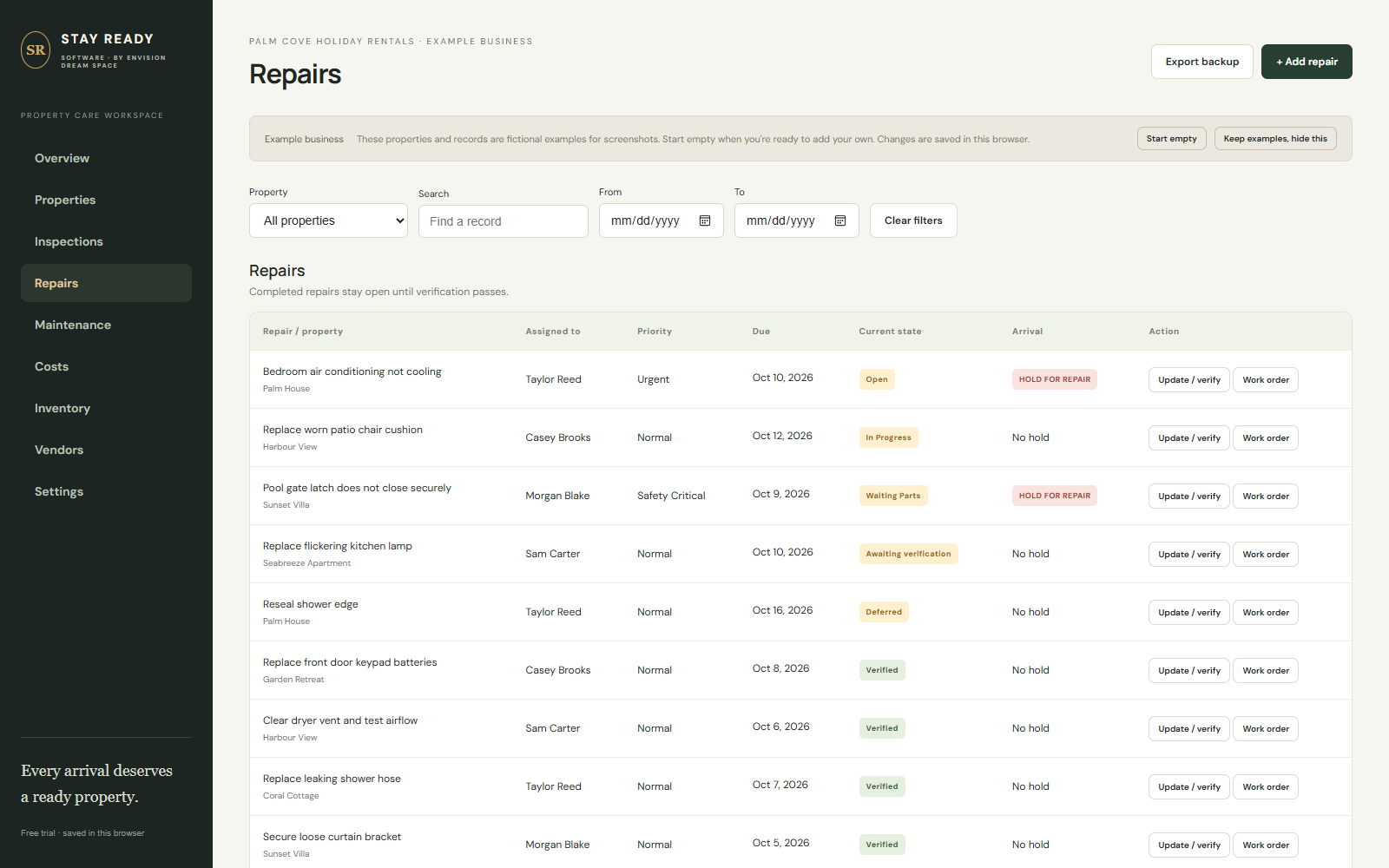
Use repair states, assigned people, due dates and arrival holds to see what still needs attention.
SEE THE PRODUCT BEFORE YOU BUY
Short introductions using actual software screens and fictional example records. AI presenter and narration are used.
01 / UNFINISHED REPAIRS
02 / THE NEXT ARRIVAL
ONE PRACTICAL PROPERTY-CARE WORKSPACE
For vacation rental hosts, co-hosts and small property managers who want to see what is holding up the next arrival.
A REAL PERSON BEHIND YOUR TOOLS
Have a question about the product, compatibility or setup? Ask before you buy: support@envisiondreamspace.com.
A dedicated property-care workspace, paid once. No booking integrations or automatic computer-to-computer sync. Review the purchase and refund terms displayed by Whop before paying.
BEFORE YOU CHOOSE
No Excel is required. The software is a $99 USD one-time purchase for one business, up to three computers. The separate Stay Ready Excel toolkit is a different product.
The package includes the Windows installer, Chrome/Edge browser edition, setup guidance and licence. After purchase, open Software in Whop for your licence key and Stay Ready Software Downloads for the customer ZIP. Paste the key into Settings → Enter licence key. Internet is needed for that first activation.
After initial activation it works offline. Records stay locally on each computer and do not automatically synchronise. Use one main workspace and export separate backups. Windows keeps the latest 30 automatic local snapshots; snapshots on the same computer do not protect against theft or drive failure.
No booking integrations or cloud sharing are included. It is a property-care recordkeeping program for hosts and managers, not a booking calendar or channel manager.
READY describes the recorded checklist result and approval. It is not a safety certification. You remain responsible for checking the property and following applicable procedures.
No photos, asset register, damage log or property health scores are included in this software edition. Compare the separate Excel edition if those manually maintained registers are important to you.
Yes. Email support@envisiondreamspace.com with your product or compatibility question. Review Whop’s purchase and refund terms before paying.
BEFORE THE NEXT CHECK-IN
Inspect. Repair. Verify. Approve the next arrival.
Buy Stay Ready Software — $99 ↗One-time purchase · No subscription · No Excel · Offline after activation
Prefer worksheets? See Stay Ready Excel →